Prerequisites

Before you can configure and use CrewAI with Connect AI, you must do the following:
  • Connect a data source to your Connect AI account. See Sources for more information.
  • Generate a Personal Access Token (PAT) on the Settings page. Copy this down, as it acts as your password during authentication.
  • Obtain an OpenAI API key at: https://platform.openai.com.
  • Make sure you have Python >= 3.10 in order to use the CrewAI tools.

Configure the Connect AI MCP Server

1
Create a folder named cdata-mcp-crew-agent.
2
Create a file with the extension .env in the cdata-mcp-crew-agent folder.
3
Copy and paste the content below. Replace "CONNECT_AI_EMAIL" with your Connect AI username and replace "CONNECT_AI_PAT" with your PAT obtained in the prerequisites. Your OpenAI API key can be found at https://platform.openai.com/.
# CData MCP Server Configuration
MCP_SERVER_URL="https://mcp.cloud.cdata.com/mcp"
MCP_USERNAME="CONNECT_AI_EMAIL"
MCP_PASSWORD="CONNECT_AI_PAT"
OPENAI_API_KEY="OPEN_API_KEY"  # Your OPEN AI API Key

Install the CrewAI Libraries

Run pip install crewai requests python-dotenv in your terminal.

Create and Run the CrewAI Agent

1
Create a file called crew-agent.py. This is the CrewAI agent.
2
Copy and paste the following, defining the agent’s tasks as desired:
import os
import base64
import requests
from dotenv import load_dotenv
from crewai import Agent, Task, Crew
# Load environment variables
load_dotenv()
# MCP Server configuration
MCP_SERVER_URL = os.getenv('MCP_SERVER_URL', 'https://mcp.cloud.cdata.com/mcp')
MCP_USERNAME = os.getenv('MCP_USERNAME', '')
MCP_PASSWORD = os.getenv('MCP_PASSWORD', '')
# Create Basic Auth header
auth_header = {}
if MCP_USERNAME and MCP_PASSWORD:
    credentials = f"{MCP_USERNAME}:{MCP_PASSWORD}"
    auth_header = {
        "Authorization": f"Basic {base64.b64encode(credentials.encode()).decode()}"
    }
# MCP tool invocation function
def call_mcp_tool(tool_name, input_data):
    payload = {
        "tool": tool_name,
        "input": input_data
    }
    try:
        response = requests.post(
            MCP_SERVER_URL,
            json=payload,
            headers=auth_header,
            timeout=10
        )
        response.raise_for_status()
        return response.json()
    except Exception as e:
        return {"error": str(e)}
# Define CrewAI agent
class MCPQueryAgent(Agent):
    def __init__(self):
        super().__init__(
            name="cdata_query_assistant",
            role="Data Query Assistant",
            goal="Help users explore and query CData Connect Cloud databases",
            backstory="You are a helpful assistant trained to interact with CData Connect Cloud via MCP tools. You understand databases, schemas, and SQL queries, and you guide users through their data exploration journey."
        )
    def get_catalogs(self):
        return call_mcp_tool("getCatalogs", {})
    def get_schemas(self, catalog):
        return call_mcp_tool("getSchemas", {"catalog": catalog})
    def get_tables(self, catalog, schema):
        return call_mcp_tool("getTables", {"catalog": catalog, "schema": schema})
    def get_columns(self, catalog, schema, table):
        return call_mcp_tool("getColumns", {
            "catalog": catalog,
            "schema": schema,
            "table": table
        })
    def query_data(self, catalog, query):
        return call_mcp_tool("queryData", {
            "catalog": catalog,
            "query": query
        })
# Instantiate agent
agent = MCPQueryAgent()
# Define tasks
task1 = Task(
    agent=agent,
    description="List top 10 available catalogs in the CData Connect Cloud",
    expected_output="Catalog list",
    output_function=lambda agent: agent.get_catalogs()
)
# Create and run crew
crew = Crew(
    agents=[agent],
    tasks=[task1]
)
if __name__ == "__main__":
    results = crew.kickoff()
    print("\n=== Final Output ===")
    for result in results:
        print(result)
3
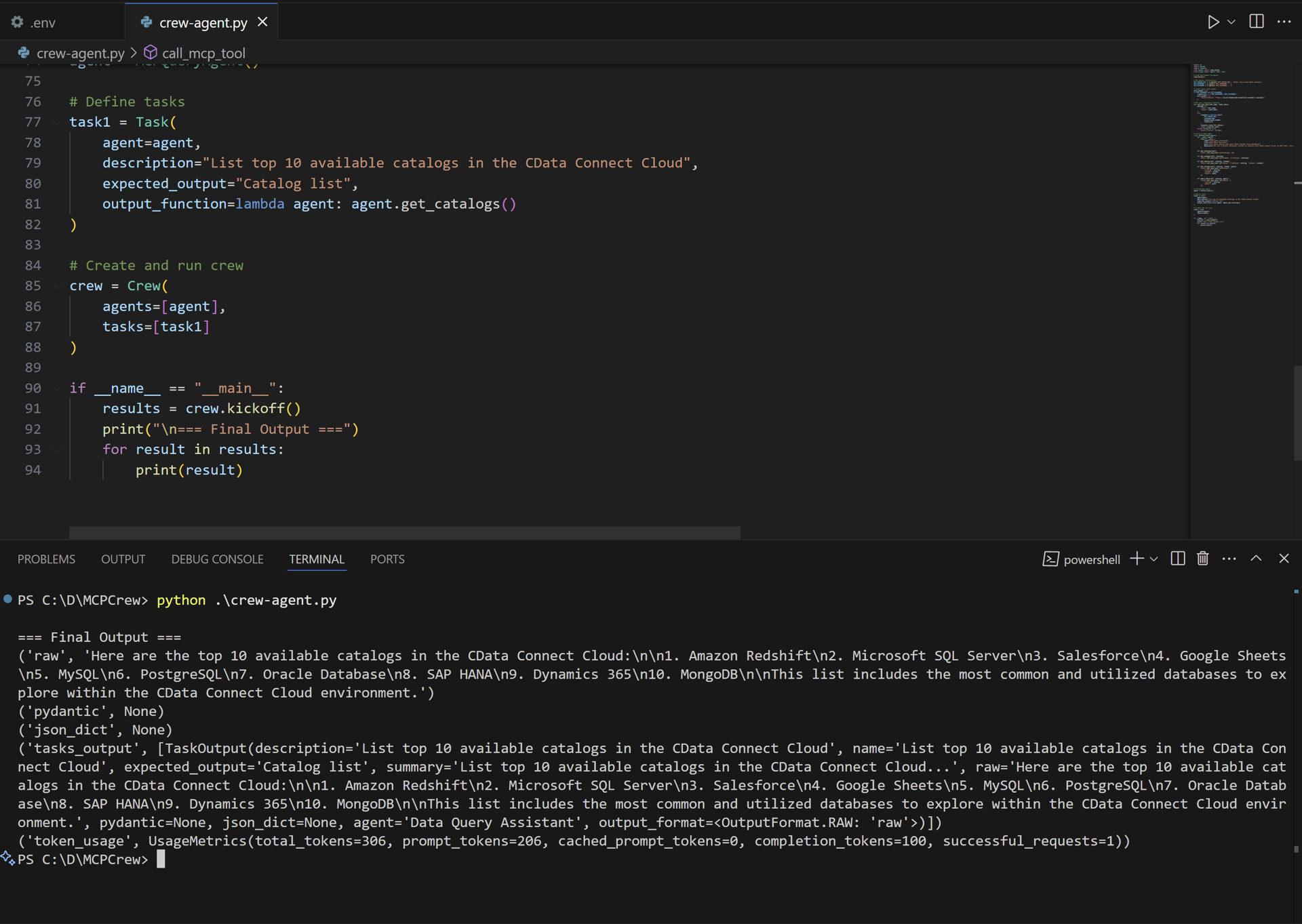
Run python crew-agent.py in the terminal. The output displays the results of the task:
CrewAI Output